Stoa Mobile · iOS & Android

The field,
captured by voice.

Stoa Mobile turns spoken field updates into structured, invoice-ready job tickets — in any language, the moment the work is done. No paper. No re-typing. No lost details on the truck seat.
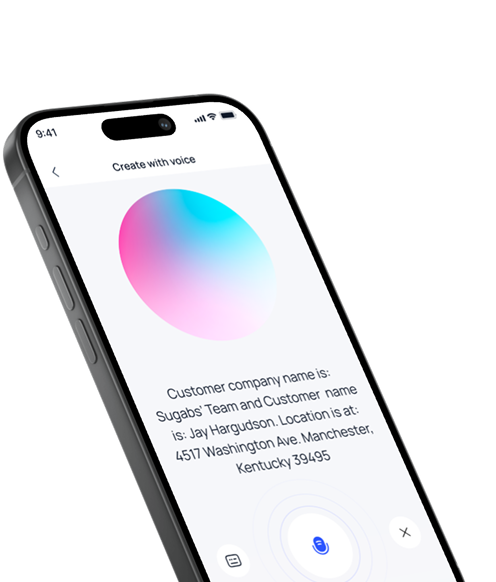
Stoa Mobile — Create with voice screen showing a transcribed customer and location
Voice-First Ticketing

Speak the job.
Stoa writes the ticket.

A technician finishes a job and just talks — naturally, in English or Spanish. Stoa Mobile records, refines the transcript, and extracts the customer, location, and job details into a structured ticket automatically.

What used to be a handwritten note photographed and re-typed days later is now invoice-ready data the second the work is complete.

Register for Early Access
Create with voice Listening
Transcription

Customer company name is: Sugabs Team and customer name is: Jay Hargudson. Location is at: 4517 Washington Ave, Manchester, Kentucky 39495.

Structured by Stoa
Customer
Sugabs Team
Contact
Jay Hargudson
Location
4517 Washington Ave, Manchester, Kentucky 39495
Built for the Field

Everything a crew needs.
Nothing they have to learn.

Core tools to create, manage, and close job tickets faster — with AI capture, real-time sync, and built-in invoicing.

Voice Ticketing
Log job tickets hands-free using AI voice capture — ideal for technicians working on site with dirty hands and a full day ahead.
Multilingual Support
Create and review tickets in English or Spanish for global and distributed teams — local language in the field, standardized data in the office.
Real-Time Sync
Every ticket synced instantly across devices, crews, and the back office. The moment a tech submits, the office sees it.
Manual Ticketing
Prefer to type? Create and edit tickets by hand whenever voice input isn't an option — same structured fields, same clean data.
Dashboard Reporting
View operational and financial performance in one unified dashboard — job tickets, billable work, technicians, and invoices at a glance.
AI-Powered Insights
QuickClerk surfaces job trends, technician performance, and billing accuracy — answers in plain language, drawn from the data your crew already enters.
How It Works

From a spoken note
to a synced ticket.

Four steps. One device. Zero paperwork.

01
Speak the update
On site, the technician taps the mic and describes the job out loud — in whatever language is natural for them.
02
AI structures it
Stoa refines the transcript and extracts customer, location, and job details into a clean, structured ticket automatically.
03
Review & approve
A manager checks the pre-filled ticket, adjusts anything needed, and approves — ready for invoicing in minutes.
04
Synced everywhere
The ticket lands in Stoa instantly — feeding invoices, dashboards, and QuickClerk with zero extra input.
FAQs

Good to know.

Everything you need to know about Stoa Mobile before getting started.

Stoa Mobile is the field-facing app for Stoa — built for service crews who manage jobs on the go: pipeline, oilfield, chemical treatment, HVAC, electrical, and any trade that closes work on site. Technicians create tickets by voice, work syncs in real time, and invoices are drafted automatically from the data captured in the field.
Yes. Stoa Mobile supports multiple languages, including English and Spanish. A technician can speak or write a ticket in the language that works best for them, and the back office still receives the same structured, standardized data.
Tap the mic and describe the job out loud. Stoa converts your voice note into a structured job ticket — automatically detecting the customer name, location, job type, and other key details from your speech, then presenting them as editable fields for review.
Once a ticket is completed and approved, Stoa prepares an invoice-ready summary with every billable line item your finance team needs — labor, equipment, materials — already populated from the field data. Managers review and send in minutes.
Stoa Mobile runs on iOS and Android phones and tablets, and every ticket stays in sync with the Stoa web platform. A technician can start a ticket on a phone in the field and a manager can finish it on a desktop in the office.
Yes. Stoa uses industry-standard encryption and security practices to protect your data. Your job records are stored securely and never shared with third parties.

Put the back office
in their pocket.

From voice-based ticket creation to automated invoicing, Stoa Mobile helps field teams close work faster — and with fewer errors.